
Digital guest book
The QR code guest book for photos, videos, voice messages and notes
Guests scan one code and share from their phone. No app, no account. Everything lands in one private guest book you keep. Free to try, then A$79 once per event.
- Free trial, no card
- Your QR code straight away
- No password
- Pay only when you are ready
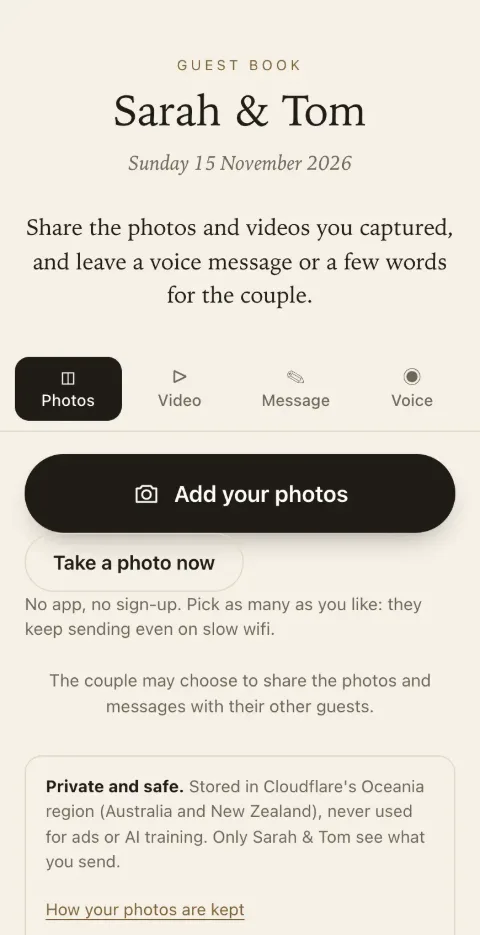
- Scan the code
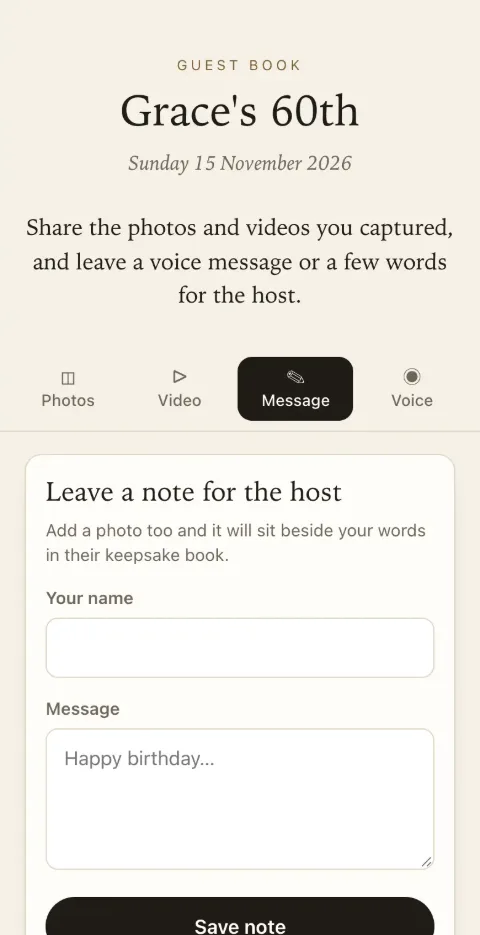
- Add photos and a message
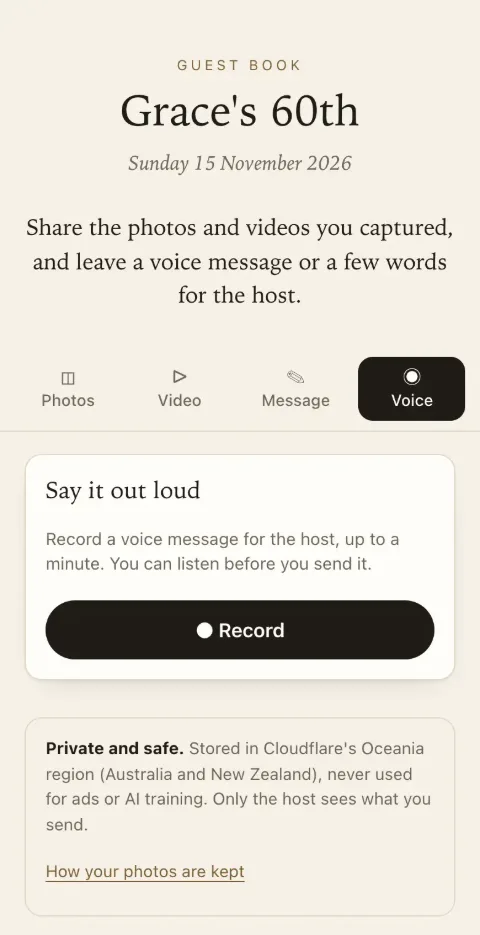
- Or record a voice note
- It is in your guest book
- No app or account for guests
- Photos, video, voice and notes
- One payment per event
- Stored in Cloudflare's Oceania region
- Never used for ads or AI
What is Keepsake?
Keepsake is a digital guest book for events. You create a guest book on keepsakego.com and get a QR code and printable table signs. Guests scan the code and add photos, short videos, voice messages and written notes from their phone's browser, with no app and no account. You see everything in your dashboard or the Keepsake iPhone app, can hide or remove anything, run a live slideshow, download every file and make a keepsake PDF of the messages. There is a free trial for up to 50 photos and voice messages. Classic is A$79 and Signature is A$129, paid once per event, in Australian dollars (GST included for Australian buyers). There is no subscription and no fee per guest.
How it works
Three steps from sign-up to guests sharing
Three steps, and nothing for your guests to install.
Three questions
Create your guest book
Choose the kind of event, give it a name and add your email. Your QR code and a live guest page appear straight away. No password.
Ready straight away
Print the sign or send the link
Pick a sign design and print table cards or a welcome sign. Or send the link in a message to guests who are far away.
On the day and after
Guests scan and share
Photos, videos, voice messages and notes arrive in your guest book as they are sent. Watch it fill up, then keep it.
Try it now
See what your guests will see
Scan the code with your phone, or open the demo guest book here. It works exactly like the real one, and nothing you pick leaves your phone.
Open the demo guest book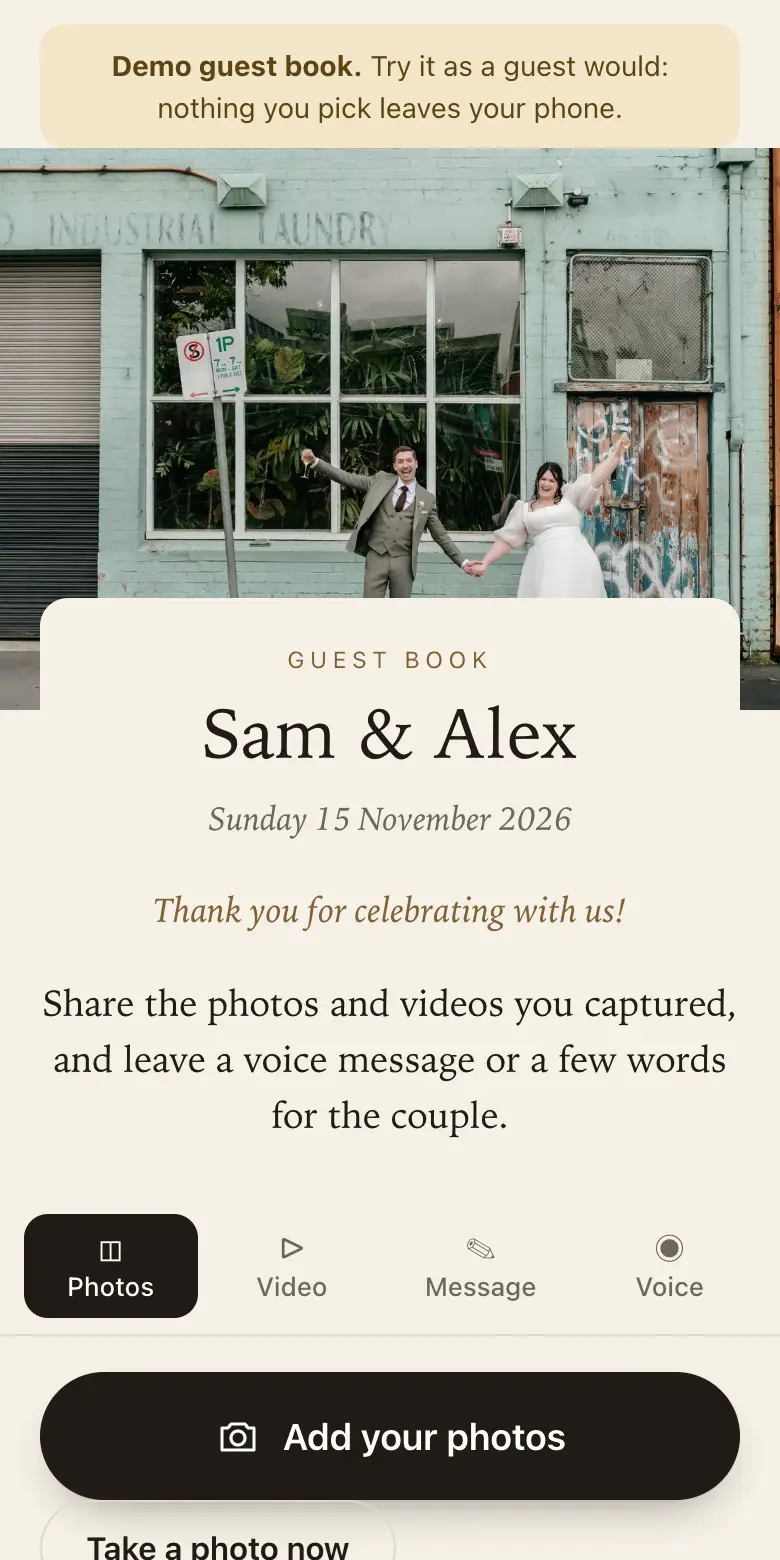
More than photos
Four ways for guests to leave something, in one place, from one QR code.
Photos
Full-size originals from the camera roll, sent small first so they appear quickly.
Short videos
Clips up to 30 seconds: the toast, the first dance, the cake.
Voice messages
Up to a minute in their own voice, recorded in the browser. An audio guest book without hiring a phone.
Written notes
A message with their name, with your prompts to help them start.
Your guests
Scan, choose, send
- Scan with the phone cameraThe guest book opens in the browser. Nothing to install, no account, no password.
- Add photos and short videosStraight from the camera roll, several at once; videos up to 30 seconds.
- Leave a message or a voice noteA few written words or up to a minute of voice, with their name if they like.
- Keeps trying on weak signalEach photo is saved on the phone first and sent in the background; if the signal drops, it waits and retries.
You
All of it, kept together
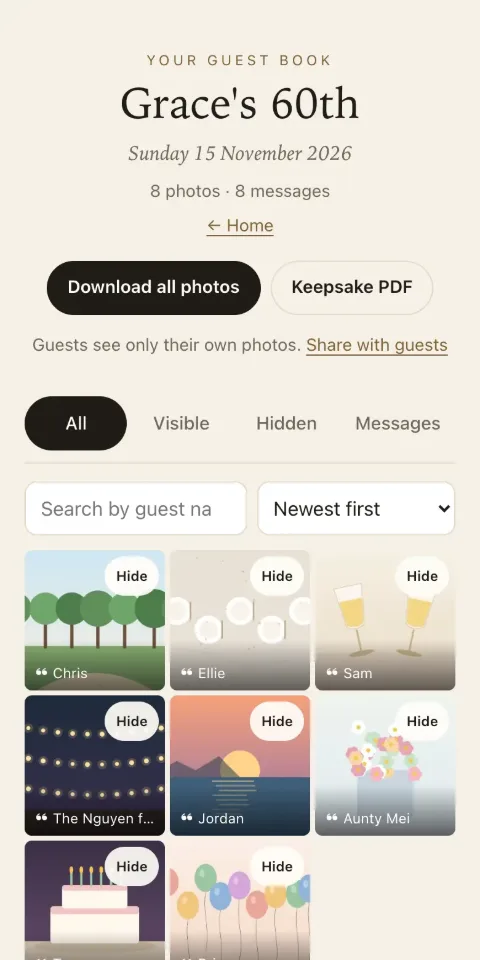
- Everything in one placeEvery photo, video, voice message and note, with who sent it and when.
- A live slideshowOpen the slideshow on a TV or projector; new photos join it as they arrive.
- Download it allFull-size originals and videos in one download, whenever you like.
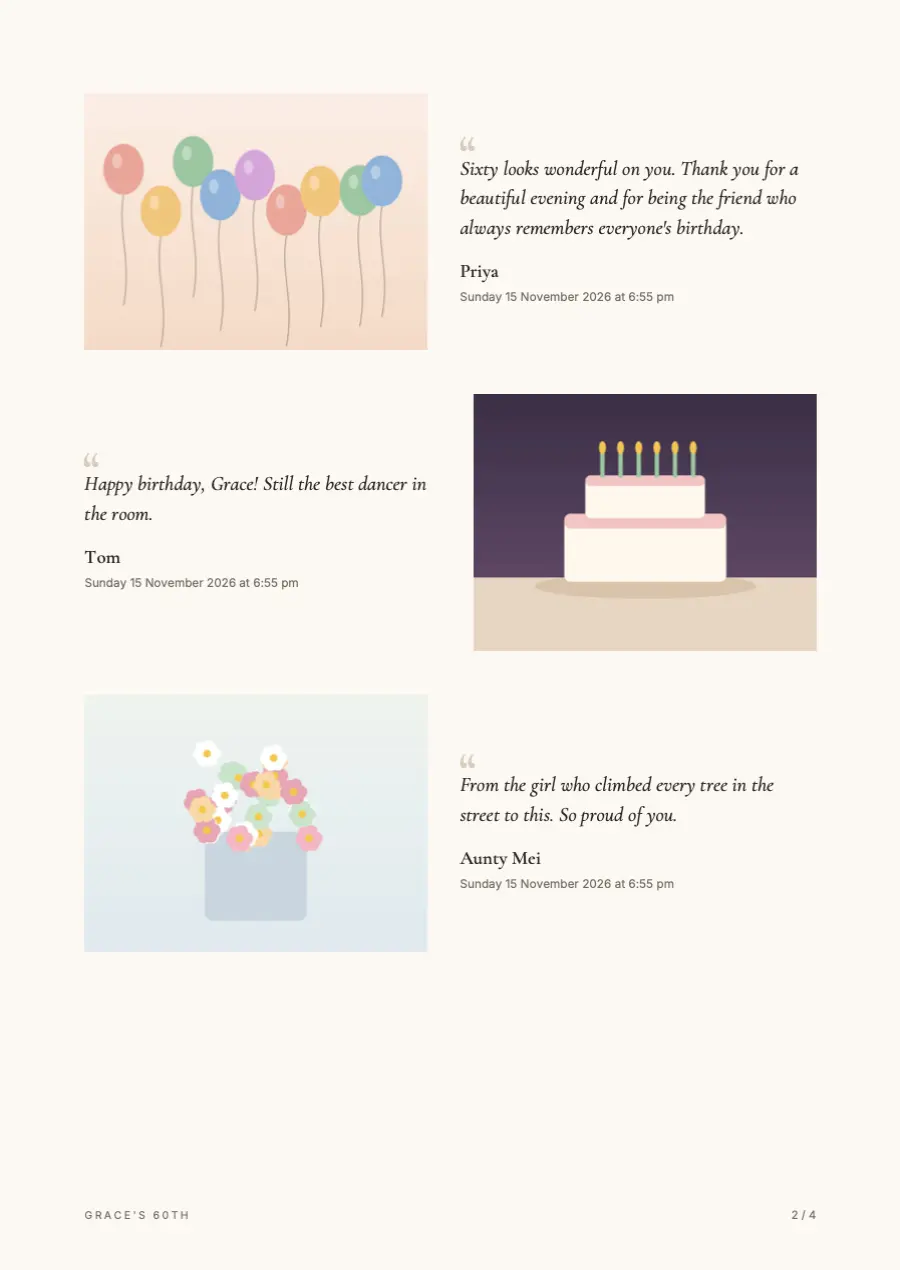
- A keepsake bookA printable PDF of every message beside its photo.
- You decide what is sharedGuests see only what they sent unless you share it. Approve photos first; hide or delete anything.
- Two of you can manage itInvite a partner or co-host; they get their own sign-in.
See what you get
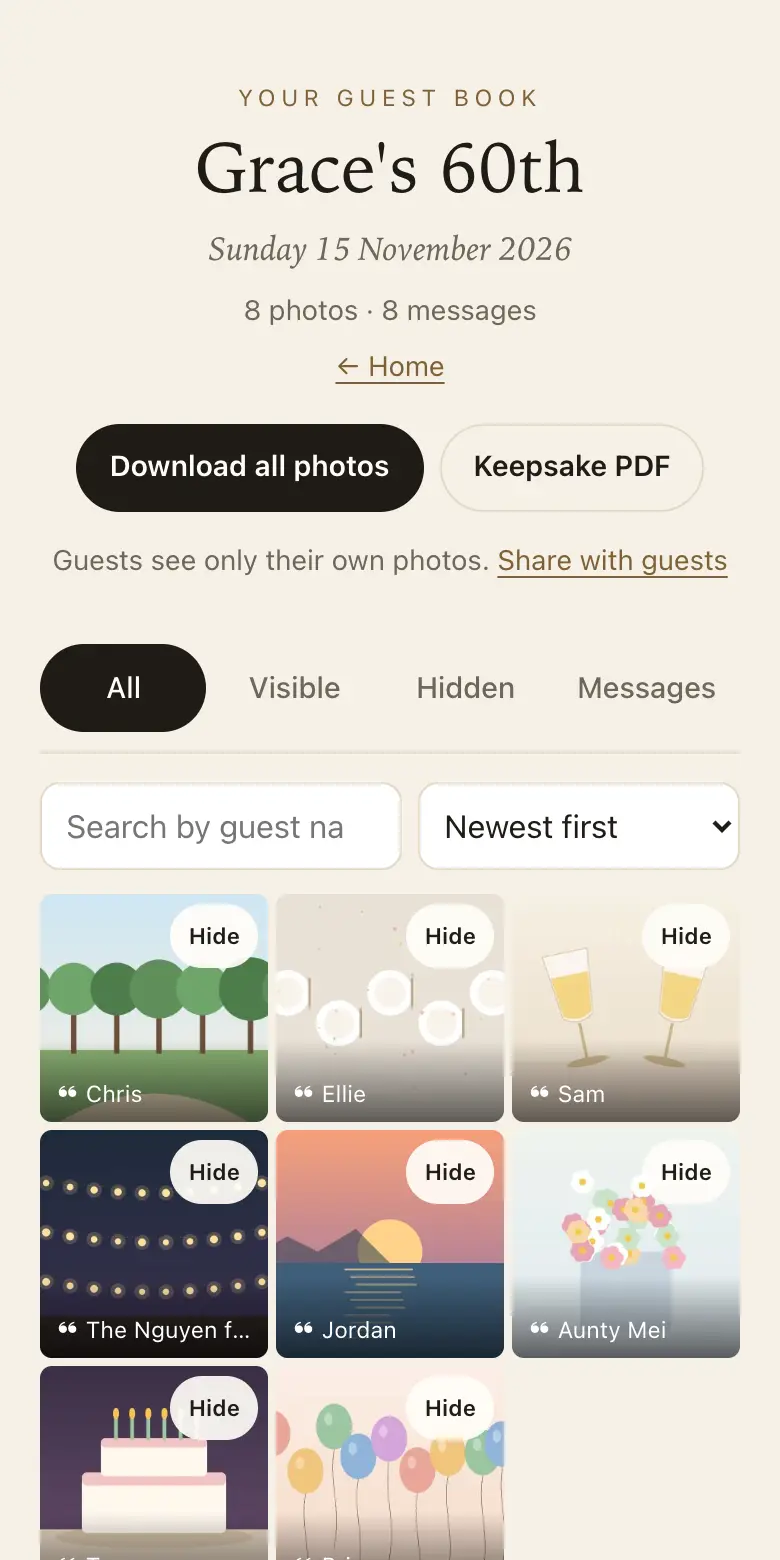
Your side of the guest book
Real screens from Keepsake, filled with a sample birthday: illustrated photos and sample messages.
For any event
Made for the day you are planning
Choose the kind of event when you sign up: the wording guests see, the prompts and the sign design follow it.
- WeddingsEvery guest's photos and a message from each of them.
- Birthdays18ths, 21sts, 30ths, 50ths and surprise parties.
- EngagementsThe party before the wedding.
- AnniversariesStories from fifty years of friends.
- Baby showersWishes and advice for the parents-to-be.
- Work eventsChristmas parties, launches, conferences, farewells.
- Celebrations of lifeMemories and photos for the family.
- Any gatheringReunions, graduations, christenings, street parties.
Pricing
One payment per event
No subscription and no fee per guest. Prices in Australian dollars. Australian buyers' prices include GST; buyers outside Australia pay no GST. Charged in Australian dollars: if your card is in another currency, your card provider converts it and may add a fee. Paid plans are not yet available to buyers in the EU, UK and Switzerland; the free trial works everywhere.
Free trial
Free
- Up to 50 photos and voice messages
- No videos
- Written messages
- Guests can share for 8 days
- Full-size downloads for 2 months
Classic
A$79 once
- No limit on how many photos, videos and voice messages, within 25 GB of storage (25 GB is roughly 5,000 phone photos, fewer with videos)
- Written messages
- Guests can share for 3 months
- Full-size downloads for 12 months
Signature
A$129 once
- No limit on how many photos, videos and voice messages, within 40 GB of storage (40 GB is roughly 8,000 phone photos, fewer with videos)
- Written messages
- Guests can share for 12 months
- Full-size downloads for 24 months
Full refund within 14 days of paying, as long as your event date has not passed. Refund terms · Compare plans
How it compares
Keepsake next to the usual ways of collecting guests' photos and messages.
| Feature | Keepsake | Shared album or group chat | Paper guest book | Hired audio guest book phone |
|---|---|---|---|---|
| Guests need an app or account | No | Often | No | No |
| Photos and videos | Yes, full size | Yes, often compressed | No | No |
| Voice messages | Yes | Sometimes | No | Yes |
| Written messages | Yes | Mixed in with chat | Yes | No |
| Guests who are not there can join | Yes, by link | Yes | No | No (the phone is at the venue) |
| Private to the host | Yes, unless you share | Everyone in it sees everything | Anyone at the table | Yes |
| Printable book at the end | Yes, PDF | No | It is the book | No |
Keepsake
- Guests need an app or account
- No
- Photos and videos
- Yes, full size
- Voice messages
- Yes
- Written messages
- Yes
- Guests who are not there can join
- Yes, by link
- Private to the host
- Yes, unless you share
- Printable book at the end
- Yes, PDF
Shared album or group chat
- Guests need an app or account
- Often
- Photos and videos
- Yes, often compressed
- Voice messages
- Sometimes
- Written messages
- Mixed in with chat
- Guests who are not there can join
- Yes
- Private to the host
- Everyone in it sees everything
- Printable book at the end
- No
Paper guest book
- Guests need an app or account
- No
- Photos and videos
- No
- Voice messages
- No
- Written messages
- Yes
- Guests who are not there can join
- No
- Private to the host
- Anyone at the table
- Printable book at the end
- It is the book
Hired audio guest book phone
- Guests need an app or account
- No
- Photos and videos
- No
- Voice messages
- Yes
- Written messages
- No
- Guests who are not there can join
- No (the phone is at the venue)
- Private to the host
- Yes
- Printable book at the end
- No
Private by default
Only you see it
Guests see only what they sent, unless you choose to share. The QR code carries a secret key, and you can add a passcode.
You approve
Have new photos wait for your OK before anyone else sees them. Hide or delete anything, any time.
Never for ads or AI
Stored in Cloudflare's Oceania region (Australia and New Zealand). Never sold, never used for advertising or to train AI.
Watch it fill up on your phone
The free Keepsake app for iPhone shows your guest book, tells you when new photos arrive and saves them to your phone. You set up and pay on this website.
Who makes Keepsake
A small Australian company you can email
Keepsake is made in Melbourne by Eclipse Media Pty Ltd (ABN 62 652 606 589), a GST-registered Australian company. Questions go to a person: email info@eclipsemedia.au and we reply within two business days.
- Your guests' photos stay yours.Never sold, never used for advertising or to train AI. Delete anything, any time.
- Stored in Cloudflare's Oceania region.Australia and New Zealand, where we set up the storage and the database.
- Straightforward money.Prices in Australian dollars, paid once by card through Stripe. Australian buyers' prices include GST; buyers outside Australia pay no GST. Full refund within 14 days of paying, as long as your event date has not passed.
Questions
What is a QR code guest book?
It is a guest book your guests open by scanning a QR code with their phone. Instead of signing a paper book, they share the photos and videos they took, record a voice message or write a note, and it all lands in one private place for the host.
Do guests need to download an app or make an account?
No. The QR code opens the guest book in the phone's web browser. Guests can add their name if they like; there is nothing to install and no password.
How quickly can I set it up?
Three questions: the kind of event, its name and your email. Your QR code and a live guest page appear as soon as you press the button, ready to scan and test. Then type the six-digit code we email you: until you do, it takes up to 10 uploads, and a guest book never confirmed is erased 24 hours after sign-up. Choose a plan when you are ready.
What can guests send?
Photos, short videos up to 30 seconds, voice messages up to a minute and written messages. Videos come with the Classic and Signature plans; the free trial takes photos, voice messages and notes.
How much does it cost? Is it a subscription?
There is a free trial for up to 50 photos and voice messages. Classic is A$79 and Signature is A$129, paid once per event, in Australian dollars (GST included for Australian buyers). There is no subscription and no fee per guest.
What is the refund policy?
Full refund within 14 days of paying, as long as your event date has not passed.
Can I show the photos on a screen at the event?
Yes. Open the slideshow on a TV, projector or laptop and it plays the photos guests have sent, adding new ones as they arrive.
What if the venue has poor signal?
Photos are saved on the guest's phone first and sent small, then in full size. If the signal drops, they wait and carry on sending when it is back.
Who can see what guests send?
Only you and your co-host, unless you choose to share. Each guest sees what they sent. You can share everything with all guests, give family a view-only link, have new photos wait for your approval, and hide or delete anything.
Where are the photos stored? Are they used for AI or ads?
With Cloudflare, in its Oceania location (Australia and New Zealand), where we created the storage and the database. That is a location we chose rather than a legal guarantee: Cloudflare offers those only for the EU and US government storage. Nothing guests send is used for advertising, sold, or used to train AI.
Can I download everything in full quality?
Yes. Download all the full-size photos and videos in one go, whenever you like while the files are kept.
Planning guides
Your QR code, straight after sign-up
Free trial, no card · Your QR code straight away · No password · Pay only when you are ready